Date and Time Format
Here you can set how dates and times are displayed in all tabs, reports and exports.
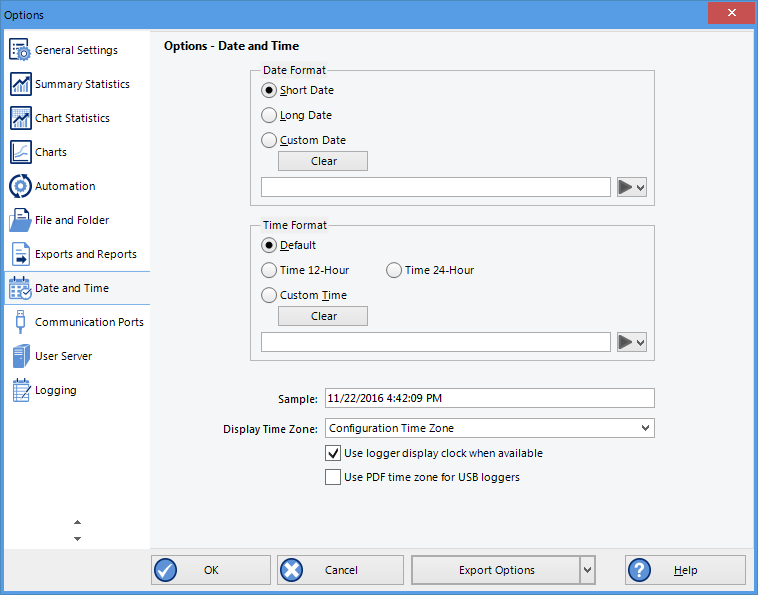
Date and time options
Short Date, Long Date and Default time use the settings from the Regional and Language settings of the Windows operating system, accessible through the Windows Control Panel.
You can customize how the date or time information is displayed by selecting Custom Date or Custom Time and combining the elements as listed in the tables Mean Kinetic Temperature. The letters must be in the correct case (for example, "MM" in the date string, not "mm" as you would use for time value). You can use the characters '.', '/', ',' or '-' to separate elements, but you cannot add text.
| Element | Meaning |
|---|---|
|
d |
Day of month as digits with no leading zero for single-digit days. |
|
dd |
Day of month as digits with leading zero for single-digit days. |
|
ddd |
Day of week as a three-letter abbreviation. |
|
dddd |
Day of week as its full name. |
|
M |
Month as digits with no leading zero for single-digit months. |
|
MM |
Month as digits with leading zero for single-digit months. |
|
MMM |
Month as a three-letter abbreviation. |
|
MMMM |
Month as its full name. |
|
y |
Year as last two digits, but with no leading zero for years less than 10. |
|
yy |
Year as last two digits, but with leading zero for years less than 10. |
|
yyyy |
Year represented by full four digits. |
| Element | Meaning |
|---|---|
|
h |
Hours with no leading zero for single-digit hours; 12-hour clock. |
|
hh |
Hours with leading zero for single-digit hours; 12-hour clock. |
|
H |
Hours with no leading zero for single-digit hours; 24-hour clock. |
|
HH |
Hours with leading zero for single-digit hours; 24-hour clock. |
|
m |
Minutes with no leading zero for single-digit minutes. |
|
mm |
Minutes with leading zero for single-digit minutes. |
|
s |
Seconds with no leading zero for single-digit seconds. |
|
ss |
Seconds with leading zero for single-digit seconds. |
|
t |
One character time-marker string, such as A or P. |
|
tt |
Multi character time-marker string, such as AM or PM. |
For example, if the date was 2 January 2012 and the date format was defined as the date would be displayed as .
A sample of the chosen date and time format is displayed in the sample box.
This setting does not affect how the date and time information is stored in a *.ltdx file, only how the information is shown.