Editing Shipments
You can edit a shipment's data at any time, if it originated from your branch [C B S R
B S R ] and it has not been completed.
Editing a shipment is useful for
- correcting errors you made during the initial entry
- changing the number of required recorders (you will receive a credit if you reduce the number of recorders, or will be debited if you increase it)
- Changing recording and alarm profiles associated with the shipment. This is only available until you have attached the first recorder to the shipment.
Click Manage Shipments from the side menu, scroll to the desired shipment and click Edit in the action column.
You will now see the Edit Shipment page, which is similar to the page shown when first creating the shipment:
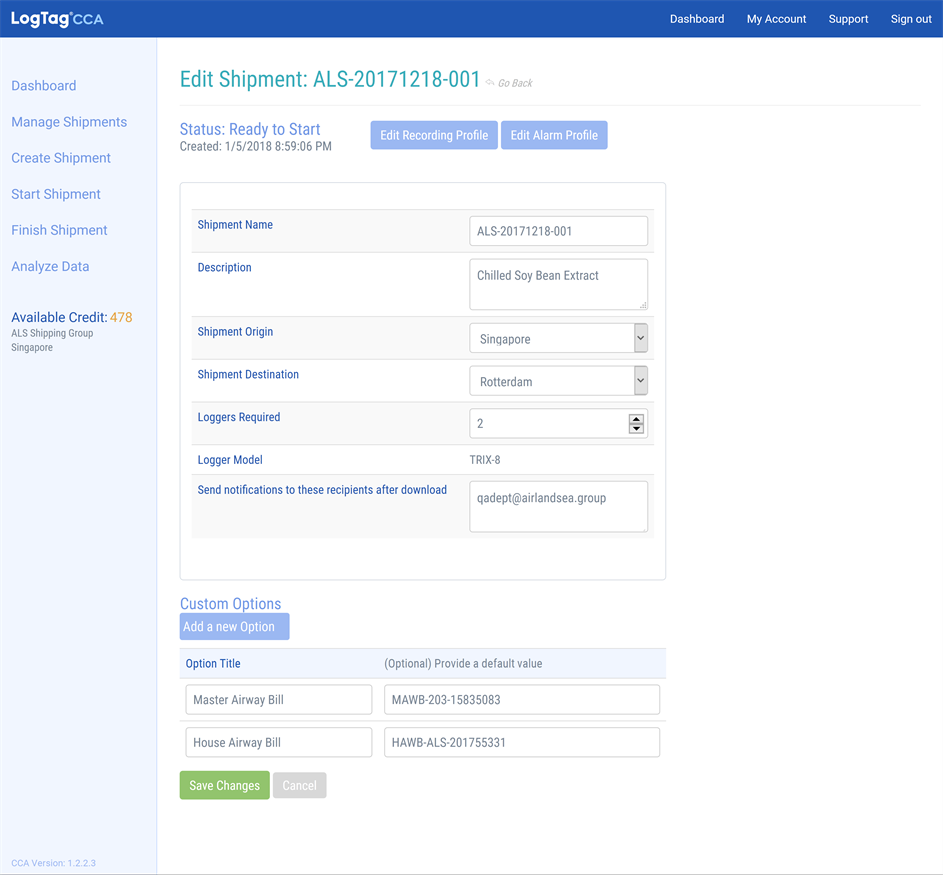
Editing a shipment
You can
- change the shipment name and description,
- make amendments to description or comments,
- change the shipment destination,
- add new serial numbers to shipments using pre-configured recorders and delete existing ones or
- change the number of recorders required for a shipment.
You can not
- change the recorder model used for the shipment,
- make changes to recording or alarm profiles once the first recorder has been attached or
- change a shipment from using pre-configured recorders to using recording and alarm profiles and vice versa.
When you have made the desired amendments click Save Changes, or click Cancel to discard the changes.