Advanced Alert Settings
Some loggers support more detailed alert settings than described before. If LogTag® Analyzer encounters one of these loggers, additional tabs are visible

You can access the extra tab by clicking on the tab's label.
In the advanced settings the red alert indicator can now be configured independently for upper and lower alert values.
Readings above X
Readings below Y
(inclusive)
In addition to entering the threshold levels, tick the boxes next to "Readings above" or "Readings below" to enable the alert conditions for only the upper or only the lower threshold settings, or for both. If both boxes are ticked, the behaviour is the same as for the standard alert settings.
After X consecutive alert readings (W minutes)
Readings above
Readings below
Tick the boxes next to "Readings above" or "Readings below" to establish whether only readings above and including the upper threshold or only readings below and including the lower threshold should count towards the consecutive alert readings. If both boxes are ticked, the behaviour is the same as for the standard alert settings. If the Alert Indicator is disabled for either the upper or the lower alert, the respective box for the consecutive alert is grayed out and cannot be ticked.
After X alert readings have occurred (W minutes)
Readings above
Readings below
Tick the boxes next to "Readings above" or "Readings below" to establish whether only readings above and including the upper threshold or only readings below and including the lower threshold should count towards the total number of alert readings. If both boxes are ticked, the behaviour is the same as for the standard alert settings. If the Alert Indicator is disabled for either the upper or the lower alert, the respective box for the alert total is grayed out and cannot be ticked.
The advanced settings tab is displayed automatically if an advanced configuration is already found in the logger to be configured. If you do not wish to use the advanced settings, click the Temperature Alarm Settings tab.
Example:
You wish to configure a LogTag® so an alert is displayed if 5 continuous readings are out-of-range or 7 total readings are out-of-range, but only if the temperature goes to 20°C and above. You wish to see in LogTag® Analyzer if the product has gone to 0°C and below, but you do not wish to trigger an alert for this condition. Alert parameters should be set as follows:
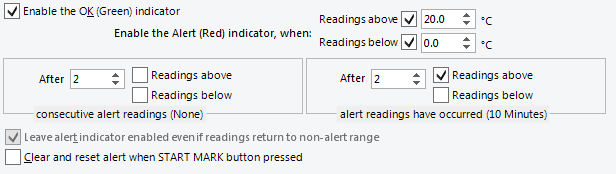
Advanced Alert Settings - Sample settings
The following table shows how different conditions would result in the Alert Indicator flashing or not:
|
What the LogTag® recorded |
What the LogTag® indicated |
|---|---|
|
2 readings of 20°C or above, return to normal, 8 readings at 0°C or below, return to normal, 4 readings of 20°C or above, return to normal |
Neither alert condition is met. No Flashing Red Alert Indicator |
|
4 readings of 20°C or above, return to normal, 4 readings of 20°C or above |
The first alert condition is not met, as the the maximum number of consecutive out-of-spec readings is only 4 (5 required.) Flashing Red Alert Indicator |
Separate alert conditions are useful if you expect the monitored product to encounter temperatures lower than the lowest possible alert temperature. In this case a flashing alert indicator may not necessarily indicate an unfavourable condition was encountered. In programs where such conditions are monitored the lower alert should be turned off.