Logging Related Configuration Parameters
Logging related configuration parameters are entered in the middle section of the Parameter Pane:
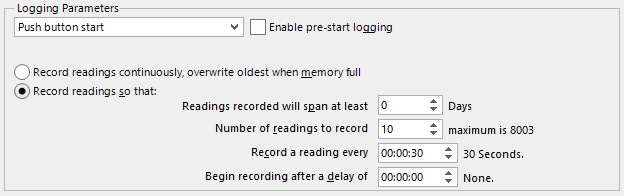
Start method
(mandatory)
This is used to determine how and when the LogTag® will start recording its next trip.
-
Push button start
When the 'Push button start' option is selected, the LogTag® will start recording when the button has been pressed and held until both the OK and Alert lights alternately flash on and off.
-
Date/Time start
When the 'Date/Time start' option is selected, the LogTag® will automatically start recording at a specified date and time. Two additional entry fields will appear, one for selecting the date, the other for the time. Enable pre-start logging and Begin recording after... (delayed start) options are not available with a date/time start.
Pressing the button prior to the start date/time will have no effect.
Note: When using the Date/Time start option, the start time must be at least two minutes into the future. This delay allows you to complete the remaining configuration options and gives the software enough time to upload the configuration to the LogTag® before it starts.
-
Push button start from hibernation
When the 'Push button start from hibernation' option is selected, the LogTag® will start as if programmed for 'Push button start'. The difference is that once the configuration is successfully uploaded to the LogTag® it will be placed into hibernation. When the button is pressed and held, the LogTag® will wake from hibernation and start recording with the parameters as configured.
Note: When using this start option, the real time clock inside the logger is suspended until logging starts. When downloading at the end of the trip, the reading times are back-calculated based on the time of the computer on which the unit is downloaded. It is therefore necessary that computer is set to the correct time, so the downloaded data have the correct date/time.
Please see Hibernation - Prolonging battery life for more information.
Not every LogTag® model can support every start mechanism. If a start option is not listed when configuring a particular LogTag®, this option is not available for this model.
Enable pre-start logging
(optional)
When you enable Pre-start logging, the logger starts taking readings as soon as the configuration data have been uploaded. If you forget to press the START button, the data for the trip will still be available. This insures no critical data are lost.
Pre-start readings will not be recorded if the start method is
Record readings continuously, overwrite oldest when memory full
(mandatory 1You must select either continuous recording, or recording for a defined time span)
When you select this option, the logger initially fills the complete memory with readings, then overwrites the oldest data when the memory is full.
Record readings so that:
(mandatory)
If this is selected, the logger stops logging taking after a pre-determined number of readings. The following two fields determine the time these recordings will cover.
Please note that some LogTag®logger models can be stopped manually, so there may be fewer than expected readings.
Readings recorded will span at least X days
If you know how many days of data you want to record, enter this number here. The shortest possible recording interval that covers this period will be automatically calculated, based on how frequently the logger takes a reading.
Number of readings to record (maximum is Y)
(mandatory)
This field will display the calculated number of readings if you select a time period and an interval. Alternatively, you can select the number of readings desired, and the time period will be calculated based on the interval. Y represents the maximum number of readings the LogTag® can store, however with a selected interval and a selected time span, you may not need to use all of the available memory.
Record a reading every X
(mandatory)
This determines how frequently the LogTag® records and stores humidity or temperature values. To change the number, use the up down and arrows. Highlight the seconds, minutes or hours value to change only those values. You can then also enter a value manually.
Begin recording after a delay of X
(optional)
Enter the time that passes after a user has pressed the START button on the LogTag® until the start of the recording. This feature is useful for example, when the LogTag® could falsely trigger an alert because the environmental conditions to be monitored are quite different to the environment in which it is started.
If pre-start logging is enabled, the LogTag® will still continue to record pre-start readings during this delay period.