User Server
The User Server options define if and how LogTag® Analyzer should connect to the LogTag® User Server software. If you do not have LogTag® User Server software installed on your computer or network, you will not need to changes these settings. Connection to the LogTag® User Server software is typically only used in multi-user environments or if your organization requires compliance with the US FDA 21 CFR Part 11 regulations for use of digital signatures that are controlled by a central administrator.
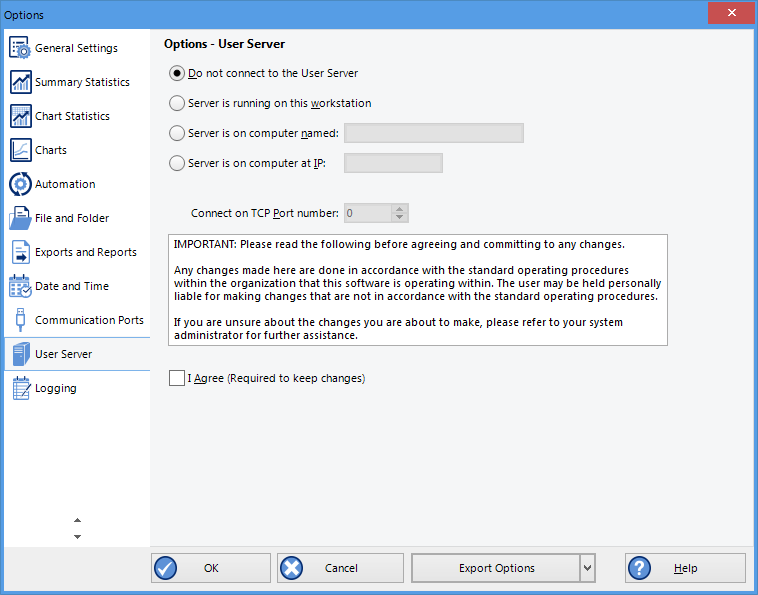
User Server options
The settings required in these fields will be provided by your network administrator. You will also need to select I agree to be able to store these settings. Once a valid connection to the LogTag® User Server software has been established, you will be required to provide a valid user name and password (How users log on) to continue using LogTag® Analyzer.
Note: If the LogTag® User Server software runs on a different computer, you need to be connected to that computer via a LAN or WAN to use LogTag® Analyzer software or make any changes to these settings. You will not be able to use LogTag® Analyzer if you cannot establish a connection to the User Server software.
For more information please refer to the Digital Signatures Suite web page, which can be accessed via the LogTag® website.
To enter or change these settings LogTag® Analyzer must be started with local administrator privileges. Close LogTag® Analyzer, right click its shortcut and click Run as administrator. Make the changes after you have provided Administrator credentials, then close LogTag® Analyzer and start as usual.
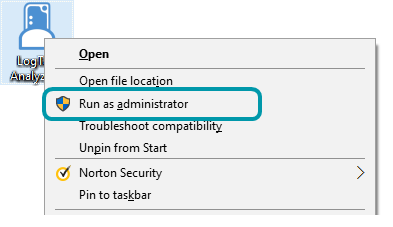
Running LogTag® Analyzer as administrator