User Server Menu
The User Server menu contains commands that allow you to log on and off. When clicking on User Server (or pressing ALT-U on the keyboard), a menu similar to the one
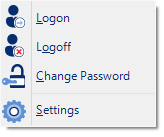
User Server menu
The following table outlines the commands you can select along with a brief explanation. Some commands do not appear if no file is open.
| Command | Explanation |
|---|---|
|
|
This allows a user to log on to and use the Analyzer software. When the software is connected to the User Server software, users must log on to the software prior to being permitted to use the software. Therefore, this command will only be available if the Analyzer software is connected to the User Server software. If a user is already logged on to the software, then this command is not visible. The section User Server explains in more detail how to get the Analyzersoftware to connect to the User Server software. |
|
|
This allows the currently logged on user to log off the Analyzer software. The username portion of this command will represent the name of the user currently logged on. If there is no currently logged on user, this command is not visible. |
|
|
This allows the currently logged on user to modify their password that they use to logon to the Analyzersoftware. This command will only be available if the Analyzersoftware is connected to the User Server software and the User Server administrator has granted the appropriate user permissions. |
|
Settings... |
This will open a window allowing you to enter the settings required to connect to or disconnect from LogTag® User Server. |


