Display Logger Advanced Settings
The Alarm settings in loggers with a display (TRID30-7, TRED30-7, TRED30-16R, TREL30-16, UTRID-16, UTRED30-16 and UTRED30-Wifiloggers) are similar to the Advanced Alert Settings or the Advanced USB Logger Settings, hence they are not explained again here.
The loggers do, however, have an additional configuration tab.

When you select this tab you can access the settings specific to the display:
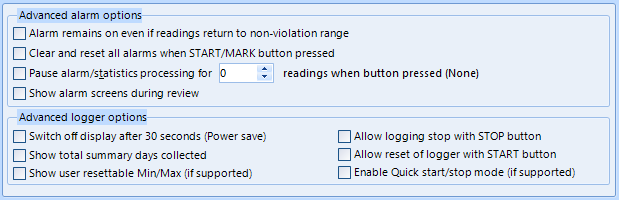
Advanced alert options for display loggers
Display Temperature In
Select if you wish to show the temperatures on the display in Fahrenheit or in Celsius. This setting does not influence how temperatures are displayed on screen when viewing data in LogTag® Analyzer. For USB Display Loggers this is located in the File Settings tab, as it influences both the
Clear and reset alarm when STOP/CLEAR button pressed
If this option is enabled, any user can turn off an active alarm directly on the LogTag® by pressing the STOP/CLEAR button. This will turn off the alarm symbol and reset the internal counters as if no alarm had occurred while the LogTag® was recording. When the LogTag® subsequently registers a further alarm condition, the alarm will activate again. Once the LogTag® has finished recording, pressing the button will not clear and reset any active alarm.
An alarm will always be registered in the day summary and cannot be cleared, regardless of whether the alarm symbol was cleared or not.
Alarm remains on even if readings return to non-violation range
If this option is enabled then the alarm symbol will stay on, even if the current reading does not meet the alarm conditions specified by the previous controls.
If this option is disabled then the alarm symbol will stay on only if the current reading meets the alarm conditions specified by the previous controls.
Please note: Unlike for units without a display these settings also apply if consecutive or accumulative alert settings are configured. If the Alarm conditions are no longer met, all counters are re-set and an alarm is triggered when the alarm condition is met again. In any case, an alarm will be registered in the day summary, regardless whether conditions re-set or not.
Pause alarm/statistics processing for X readings
If this option is enabled, pressing either button on the LogTag® while recording excludes the next reading from the alarm and statistics calculations; PAUSED will now be shown on the display. This allows the user to review the statistics or clear an alarm without causing an invalid reading, alarm or statistic.
Switch off display after 30 seconds
If this option is enabled, the display will turn off after 30 seconds to save battery power.
Allow logging stop with STOP button
If this option is enabled, the LogTag® can be stopped by pressing the button. The recorder will no longer take any readings, however you can still review the day statistics and download the logged results to a PC with LogTag® Analyzer.
Allow reset of logger with START button
If this option is enabled, TRID30-7, TRED30-7 and TRED30-16R loggers can be reset to the same conditions as if they had been freshly configured by LogTag® Analyzer. You can then start another trip by simply pressing the button.
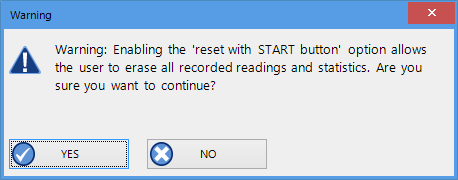
When this option is enabled, anyone with access to the logger can erase all recorded readings and statistics without saving the data to a PC first. Please use this option with caution!
A warning box will be displayed to remind you this is enabled and can result in loss of data.
Show total summary days collected
If this option is enabled, the LogTag® shows the number of days for which statistics have already been collected on the display.
Please refer to the LogTag® Product Specification & User Guide documents for TRID30-7,TRED30-7 and TRED30-16R loggers on the LogTag®
Note: When referring to TRID30-7 and TRED30-7 products, versions with both the fixed (F-suffix) and replaceable (R-suffix) battery are included, unless a suffix is specifically mentioned.
Show alarm screens during review
This option only applies to the UTRID-16. If selected, up to 6 additional screens are shown when reviewing the data on the display. These screens show the temperature alarm threshold, and the time above or below that threshold. If the box is cleared, only the minimum and maximum screens are shown.
For more information please refer to the UTRID-16 PDF Recorder User Guide, available from the LogTag®
Enable Quick start/stop if available
This option only applies to TRED30-16R models. If enabled, starting and stopping a TRED30-16R is faster than that of TRID30-7 and TRED30-7. Instead of holding the start button for 6 seconds (TRID30-7 and TRED30-7), you will only need to press the button for approx. 1 second until the unit starts or stops. For more detailed information please refer to the TRED30-16R User Guide, available on the LogTag®
If disabled, the standard start/stop method (6-second button press) is used.
Show user resettable Min/Max (if supported)
This option only applies to newer TREL30-16 and TRED30-16R models. These devices can display trip min/max settings in addition to the daily min/max settings. If you enable this setting, these min/max settings will be displayed when you review the day statistics. The min/max values can be reset any time while the unit is logging. For more information please refer to the Product User Guides for the relevant products.
Allow user to reset trip Min/Max values
This option only applies to UTRED30-16 and UTRED30-Wifi models. For these devices, trip min/max settings are permanently being shown on the display. If you enable this setting, a user may reset the min/max values any time while the unit is logging.